
Add License Protection to your .NET application whether it is a .NET WinForms application, a .NET WPF application, an Office add-on, a web service, a Sharepoint app, etc..
With QLM’s .NET Licensing Framework, you can provide permanent, trial or subscription based licensing to your customers. Your customers can easily activate their license online when connected to the internet or offline if they are not connected to the internet.
Here are some of the features supported by QLM’s .NET Licensing System:
- Bind a license key to a specific computer
- Create time limited trial license keys
- Online and Offline activation of license keys
- eCommerce integration with leading eCommerce providers
- Fully automated workflow for Subscription based products
- Add a Check for Updates feature to your software so that your customers are always current with your latest release
- Send scheduled customized email messages to your customers to notify them of specials and/or upcoming releases.
- Track installs and uninstalls of your software to assist you in understanding customer behavior and improve download trends
License Protection for .NET Desktop Apps
[/fusion_text][fusion_text]- .NET 2.0 and .NET 4.0+ applications
- 32 bit or 64 bit or AnyCPU applications
- WinForms
- WPF
License Protection for ASP.NET Apps
[/fusion_text][fusion_text]- ASP.NET 2.0
- ASP.NET 4.0+
- 32 bit or 64 bit or AnyCPU applications
- Sharepoint
The QLM API is available as a .NET assembly that you simply reference in your project.
For WinForms and WPF, QLM includes .NET User Controls for license activation that you simply drop into your form. These User Controls provide a user interface that allows the user to enter a license key and activate it. This eliminates most of the coding required to integrate QLM into your application.
To help you get started, we provide many .NET samples that you can use as a reference to implement licensing in your own .NET application. The samples are located in the following folders:
C:\Users\Public\Documents\Quick License Manager\Samples\qlmpro\Windows\DotNet
[/fusion_text][fusion_text]QLM License Wizard User Control (WinForms and standalone executable)
[/fusion_text][fusion_imageframe image_id=”12709″ style_type=”none” hover_type=”none” bordersize=”0px” borderradius=”0″ align=”none” lightbox=”no” alt=”Quick License Manager – License Wizard” linktarget=”_self” hide_on_mobile=”small-visibility,medium-visibility,large-visibility” animation_direction=”down” animation_speed=”0.1″]https://soraco.co/wp-content/uploads/2017/06/Wizard-ActivateOnline.png[/fusion_imageframe][fusion_text]QLM Activation User Control (WinForms and WPF)
[/fusion_text][fusion_imageframe style_type=”none” hover_type=”none” bordersize=”0px” borderradius=”0″ align=”none” lightbox=”no” alt=”Quick License Manager – Activation Form” linktarget=”_self” hide_on_mobile=”small-visibility,medium-visibility,large-visibility” animation_direction=”down” animation_speed=”0.1″]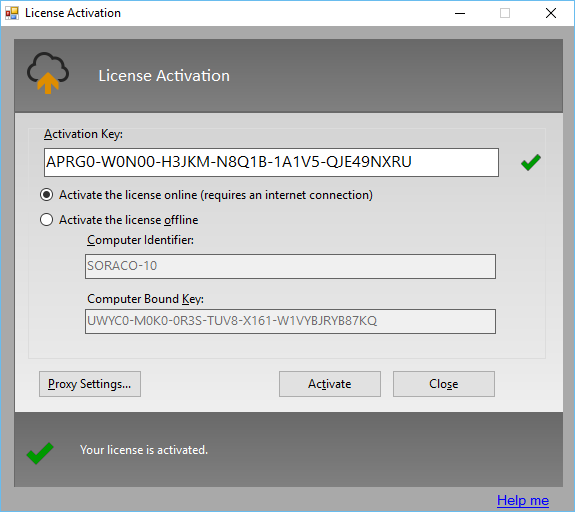 [/fusion_imageframe][/fusion_builder_column][/fusion_builder_row][/fusion_builder_container][fusion_builder_container hundred_percent=”yes” overflow=”visible” type=”legacy”][fusion_builder_row][fusion_builder_column type=”1_1″ layout=”1_1″ background_position=”left top” background_color=”” border_color=”” border_style=”solid” spacing=”yes” background_image=”” background_repeat=”no-repeat” padding_top=”” padding_right=”” padding_bottom=”” padding_left=”” margin_top=”0px” margin_bottom=”0px” class=”” id=”” animation_type=”” animation_speed=”0.3″ animation_direction=”left” hide_on_mobile=”no” center_content=”no” min_height=”none” last=”true” hover_type=”none” link=”” border_position=”all” align_self=”flex-start” border_sizes_top=”” border_sizes_bottom=”” border_sizes_left=”” border_sizes_right=”” first=”true”][fusion_text]
To learn more about QLM’s .NET License Manager, visit our main QLM product page.
[/fusion_text][/fusion_builder_column][/fusion_builder_row][/fusion_builder_container]