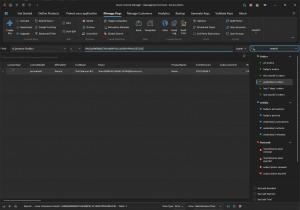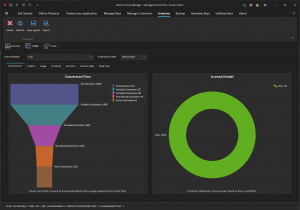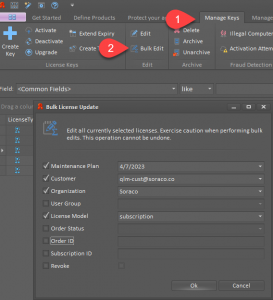

Managing software licenses shouldn’t slow you down or require juggling multiple tools. Quick License Manager’s graphical user interface brings everything into one place, letting you handle licenses and customers with clarity and control. From desktop to mobile, its user-friendly software puts powerful license management features right at your fingertips. Keep reading to see how QLM’s interface can simplify your workflow and strengthen your software licensing process. For more on software license management tools, check out this resource.
Overview of QLM’s User-Friendly GUI

Diving into QLM’s graphical user interface, it’s clear that simplicity meets power. This section unveils how the interface empowers you in managing licenses and customers seamlessly.
Streamlined License Management Features
Imagine accessing all your license management needs in one place. With QLM, this becomes your reality. Its interface offers a clean and organized way to manage different license types—be it perpetual, trial, or subscription. You can easily track, renew, or modify licenses based on your business requirements.
-
Central Dashboard: Offers a snapshot of all active licenses.
-
Easy Modification: Update license terms with a few clicks.
-
Automated Processes: Set up automatic renewals to save time.
Most people think managing licenses is complex, but QLM proves that wrong. Its intuitive layout reduces errors and enhances productivity. You won’t need to juggle multiple tools, thanks to QLM’s all-in-one solution.
Comprehensive Customer Management Tools
Managing customer relations shouldn’t be a headache. QLM equips you with robust tools to handle customer data efficiently. You can view, edit, and organize customer information, ensuring you meet their needs effectively.
-
Customer Profiles: Store and access detailed customer information easily.
-
Communication Logs: Keep track of all interactions in one place.
-
Customizable Fields: Tailor customer data fields to your specific needs.
Here’s the key insight: When customer management is simplified, you have more time to focus on growth. With QLM, you ensure no detail slips through the cracks, making customer interactions smooth and professional.
Benefits of Quick License Manager

Exploring QLM’s advantages reveals how it transforms your software licensing approach. From simplifying processes to enhancing user engagement, its benefits are undeniable.
Simplifying Software Licensing
QLM makes complexity a thing of the past. You can set up licenses quickly and manage them with ease. The interface is designed to be user-friendly, ensuring even the less tech-savvy can navigate it without trouble.
-
Quick Setup: Get your licenses up and running in minutes.
-
User-Friendly Navigation: Spend less time figuring out how to use the tools.
-
Effortless Integration: Sync with existing systems seamlessly.
Here’s a pattern break: Most tools overpromise and underdeliver, but QLM consistently provides value. Your software licensing becomes a straightforward task, freeing up resources for more strategic initiatives.
Enhancing User Experience
A great user experience is crucial. QLM prioritizes this by offering tools that are not only functional but also pleasant to use. The interface is designed to minimize clicks and maximize efficiency.
-
Intuitive Design: No steep learning curve—get started instantly.
-
Consistent Updates: Keeps the software fresh and responsive to user feedback.
-
Responsive Support: Quick assistance whenever you need it.
QLM challenges the idea that management software must be cumbersome. It proves that ease of use and power can coexist, allowing you to provide an excellent experience to your team and customers.
Scheduling a Demo with QLM
Curious to see QLM in action? Scheduling a demo is your next step. This section guides you through booking a session and preparing to get the most from your demo.
Steps to Book a Session
Ready to explore QLM firsthand? Booking a demo is straightforward. Here’s how you can secure your spot:
-
Visit the QLM Website: Navigate to the demo scheduling page.
-
Select a Convenient Time: Choose a slot that fits your schedule.
-
Confirm Your Details: Fill in your contact information and submit.
Most people delay demos out of hesitation, but taking this step could simplify your operations significantly. Don’t miss out on this opportunity to enhance your software licensing process.
Preparing for Your Demo Session
To maximize your demo experience, a little preparation goes a long way. Here’s how to get ready:
-
Identify Key Questions: What specific challenges are you facing?
-
List Current Systems: Knowing your existing tools helps tailor the demo.
-
Invite Stakeholders: Ensure decision-makers are present to provide input.
The longer you wait, the more you miss out on streamlining your workflow. QLM’s demo is not just a presentation—it’s your gateway to more efficient license management. Schedule your session today to see how QLM can revolutionize your approach. For more on customer management systems, check out this guide.
In summary, QLM’s intuitive GUI is your ally in achieving efficient and effective license management. With streamlined features and comprehensive tools, it transforms potential challenges into manageable tasks, positioning your business for growth and success.